
You can record and manage an employee’s salary increment in Employee Details > Pay Details. Once an increment is added, the system will automatically calculate and apply the new salary on the effective period.
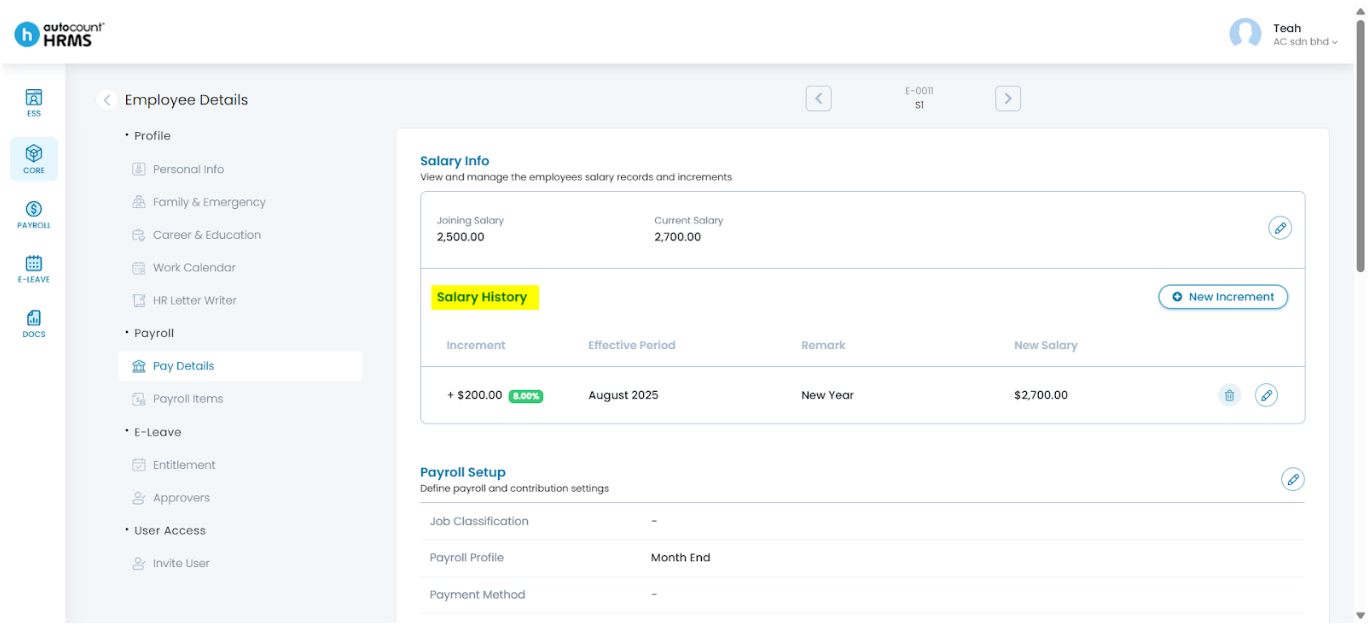
Steps to Maintain Employee Increment:
- Go to Core > Employee.
- Under Employee Maintenance, click Employee.
- Locate the employee and click the pencil icon next to the employee’s name.
- Navigate to Pay Details and scroll to Salary Info.
- Click New Increment next to Salary History.
- Enter the increment value, effective period, a short remark and review the calculated New Salary.
- Click Save to apply the increment.
Refer to Employee Pay Details for full instructions and other Pay Details settings’ guide.
Written by: Teah Rui Harn (20251231)
Reviewed by: Tek Ee Lin (20260107)