
You can control the leave types an employee is allowed to apply for by assigning employees to the appropriate Entitlement Group. This can be done directly from the Employee Profile > Entitlement.
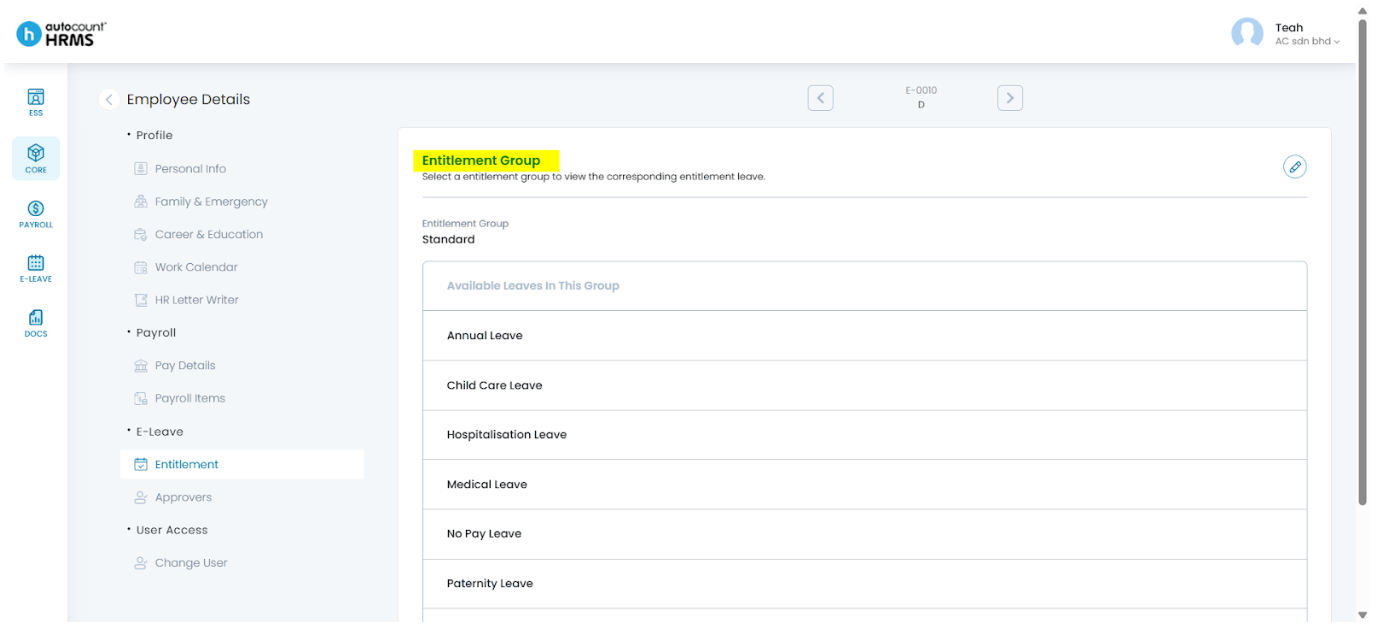
Steps to Update an Employees’ Entitlement via Core:
- Go to Core > Employee.
- Under Employee Maintenance, click Employee.
- Locate the employee and click the pencil icon beside the employee’s name.
- Under Employee Details, select Entitlement.
- Click the pencil icon to edit entitlement details.
- Select the appropriate Entitlement Group from the drop-down list. Click the setting icon if you would like to update entitlement group options. Alternatively, you may update the entitlement group in E-Leave > Setting > Entitlement Group.
- Click Save.
Refer to Entitlement for detailed explanations.
Written by: Teah Rui Harn (20251231)
Reviewed by: Tek Ee Lin (20260108)