
You can control what functions each user can access in HRMS—such as assigning leave approver or payroll management permissions—through User Maintenance in the Core module.
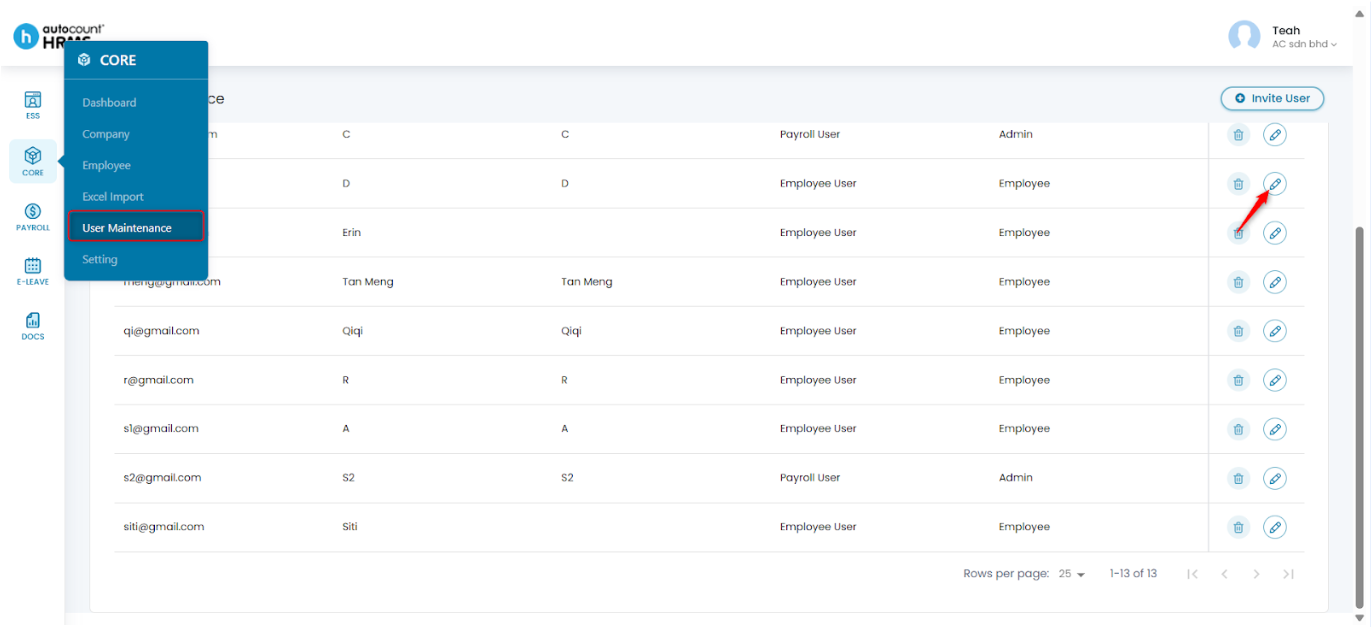
Steps to Update an Employee’s Access Rights:
- Go to Core > User Maintenance.
- Locate the employee and click the pencil icon to edit the user.
- Select to update the User Type as required:
- Employee User – Access to ESS (Employee Self Service) module and can be assigned as Leave Approver.
- Payroll User – Access to some or all system modules depending on user role and can be assigned as Leave Approver.
- Click Save to apply the changes.
Refer to User Maintenance for detailed explanations.
Written by: Teah Rui Harn (20251231)
Reviewed by: Tek Ee Lin (20260108)